Difference between revisions of "Phalcon"
(→Tutorial - basic) |
|||
| Line 26: | Line 26: | ||
==[[Tutorial - basic]]== | ==[[Tutorial - basic]]== | ||
Throughout this tutorial, we'll walk you through the creation of an application with a simple registration form from the ground up. The following guide is to provided to introduce you to Phalcon framework's design aspects. | Throughout this tutorial, we'll walk you through the creation of an application with a simple registration form from the ground up. The following guide is to provided to introduce you to Phalcon framework's design aspects. | ||
| + | |||
| + | ==Tips & Tricks== | ||
| + | ===Auto complete for Phalcon framework in Eclipse=== | ||
| + | |||
| + | Thank for Phalcon Developer tool. It provide useful interface & class declaration scripts which support IDE auto complete function. | ||
| + | |||
| + | Assuming that, Phalcon developer tools is installed. If no, you can download or clone a cross platform package containing the developer tools from Github. | ||
| + | |||
| + | GitHub link : [https://github.com/phalcon/phalcon-devtools https://github.com/phalcon/phalcon-devtools] | ||
| + | |||
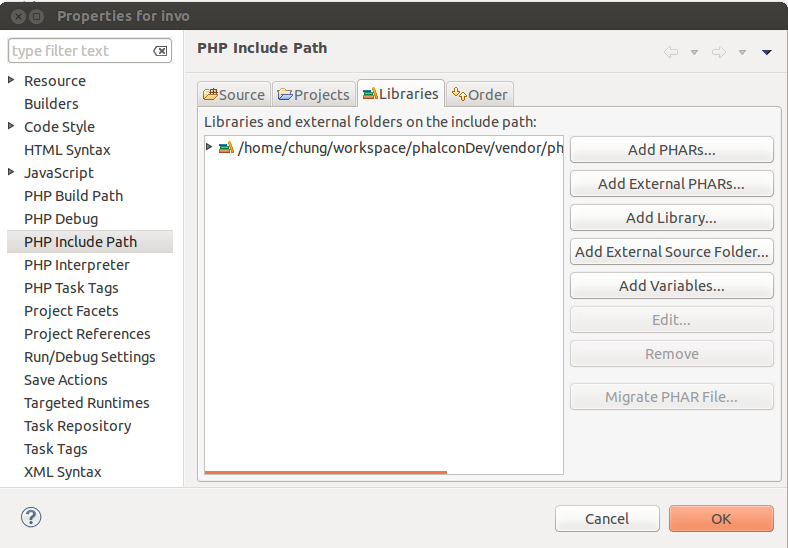
| + | In Eclipse, you just need to add devtool path : phalcon-devtools/ide/PHALCON_VERSION by adding external Source Folder in PHP include Path / Libraries tab. | ||
| + | |||
| + | http://3.bp.blogspot.com/-AbVlu5ctEzM/UzEDy8Il1aI/AAAAAAAACGs/cMhkdQcu0pk/s1600/phalcon-auto-compelete-eclipse.png | ||
Latest revision as of 05:46, 24 June 2018

Phalcon is a web framework implemented as a C extension , every Phalcon's fan know that. It mean we cannot view source code of framework like another PHP framework.
File structure
.
└── tutorial
    ├── app
    │   ├── controllers
    │   │   ├── IndexController.php
    │   │   └── SignupController.php
    │   ├── models
    │   │   └── Users.php
    │   └── views
    └── public
        ├── css
        ├── img
        ├── index.php
        └── js
Contents
Phalcon Developer Tools
These tools are a collection of useful scripts to generate skeleton code. Core components of your application can be generated with a simple command, allowing you to easily develop applications using Phalcon.
Tutorial - basic
Throughout this tutorial, we'll walk you through the creation of an application with a simple registration form from the ground up. The following guide is to provided to introduce you to Phalcon framework's design aspects.
Tips & Tricks
Auto complete for Phalcon framework in Eclipse
Thank for Phalcon Developer tool. It provide useful interface & class declaration scripts which support IDE auto complete function.
Assuming that, Phalcon developer tools is installed. If no, you can download or clone a cross platform package containing the developer tools from Github.
GitHub link : https://github.com/phalcon/phalcon-devtools
In Eclipse, you just need to add devtool path : phalcon-devtools/ide/PHALCON_VERSION by adding external Source Folder in PHP include Path / Libraries tab.