Difference between revisions of "Phalcon"
(Created page with "http://1.bp.blogspot.com/-elRmuZFBOvI/UzIkX3WkSOI/AAAAAAAACG8/QHJ_Vh-X77c/s1600/phalcon+logo.jpg Phalcon is a web framework implemented as a C extension , every Phalcon's fan...") |
|||
| Line 10: | Line 10: | ||
Thank for Phalcon Developer tool. It provide useful interface & class declaration scripts which support IDE auto complete function. | Thank for Phalcon Developer tool. It provide useful interface & class declaration scripts which support IDE auto complete function. | ||
| − | Assuming that, Phalcon developer tools is installed. | + | Assuming that, Phalcon developer tools is installed. If no, you can download or clone a cross platform package containing the developer tools from Github. |
| + | |||
| + | GitHub link : [https://github.com/phalcon/phalcon-devtools https://github.com/phalcon/phalcon-devtools] | ||
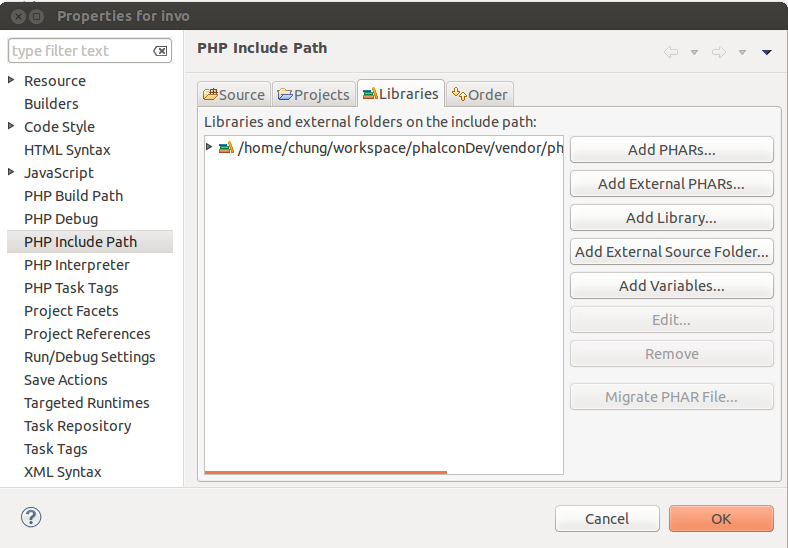
In Eclipse, you just need to add devtool path : phalcon-devtools/ide/PHALCON_VERSION by adding external Source Folder in PHP include Path / Libraries tab. | In Eclipse, you just need to add devtool path : phalcon-devtools/ide/PHALCON_VERSION by adding external Source Folder in PHP include Path / Libraries tab. | ||
http://3.bp.blogspot.com/-AbVlu5ctEzM/UzEDy8Il1aI/AAAAAAAACGs/cMhkdQcu0pk/s1600/phalcon-auto-compelete-eclipse.png | http://3.bp.blogspot.com/-AbVlu5ctEzM/UzEDy8Il1aI/AAAAAAAACGs/cMhkdQcu0pk/s1600/phalcon-auto-compelete-eclipse.png | ||
Revision as of 05:35, 24 June 2018

Phalcon is a web framework implemented as a C extension , every Phalcon's fan know that. It mean we cannot view source code of framework like another PHP framework.
Auto complete for Phalcon framework in Eclipse
Thank for Phalcon Developer tool. It provide useful interface & class declaration scripts which support IDE auto complete function.
Assuming that, Phalcon developer tools is installed. If no, you can download or clone a cross platform package containing the developer tools from Github.
GitHub link : https://github.com/phalcon/phalcon-devtools
In Eclipse, you just need to add devtool path : phalcon-devtools/ide/PHALCON_VERSION by adding external Source Folder in PHP include Path / Libraries tab.